
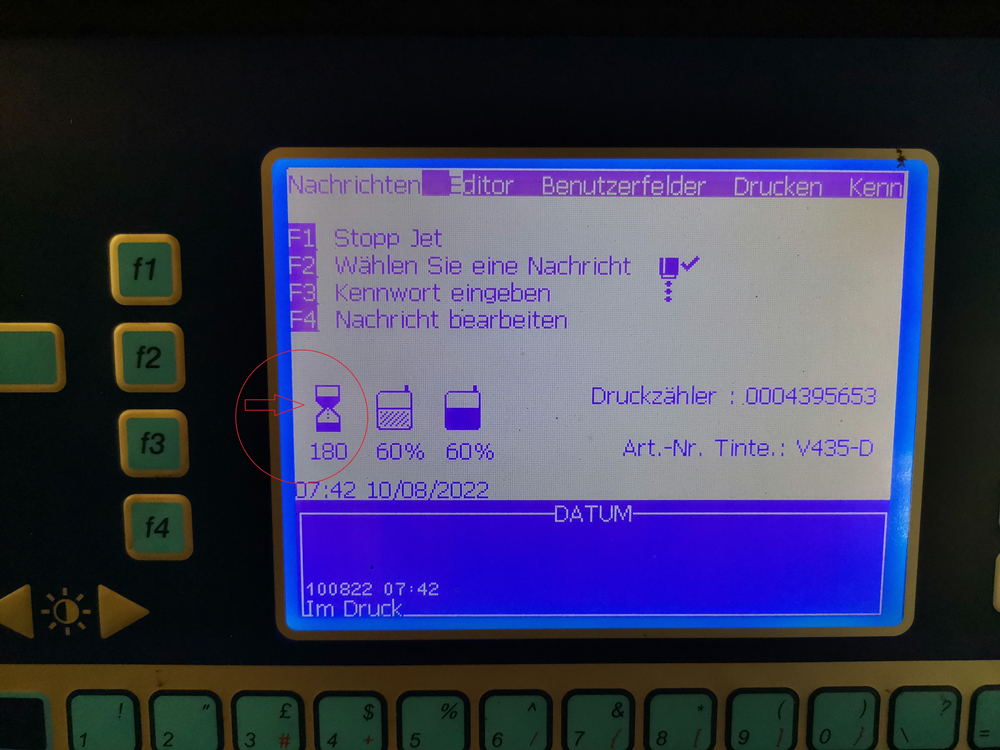
Is there any sign showing that it’s time to replace a new inkcore board? Sure there is. Look at the hourglass, we can see there is only 180 hours left, time to replace a new inkcore board(if your inkcore works fine). Actually we don’t need to replace a whole inkcore, which is costy and unnecessary, if the inkcore works well, the only problem is running out of servce hour, replacing a new inkcore board will be well enough.
So how to replace an inkcore board, firstly, we need to locate the inkcore. Secondly, open up the inkcore and you will find a green board, this is the inkcore board we are looking for. Thirdly, as you can see, the inkcore board is screwed, make sure that you are able to screw it out and in, then we can proceed to buy a new replacement.

I reckon you know the model your Videojet printer, if not, please kindly refer to the plate on your printer, you will see if it’s 1210, 1520, 1610 etc. Then we need to figure out which type of inkcore board you are applying now, you could send us a picture or do it yourself.


It’s not as difficult as you think right, let’s crack on.


 L&S CIJ Codification Parts